
How to Make Passive Income as a UI/UX Designer: 10 Practical Ways
Why treating your design assets like software releases unlocks sustainable, scalable income
Many UI and UX designers discover digital products out of exhaustion. When your income depends on billable hours, taking a sick day or a vacation means your earnings freeze immediately. Moving away from hourly billing sounds appealing, but the design community often presents an oversimplified view of what passive revenue actually involves.
Passive income for UI designers does not mean throwing together a random pack of screens, putting it online, and watching royalties pile up. The creators who build durable, recurring revenue treat their design files like open-source software libraries. They build with rigorous structure, maintain semantic tokens, document component variants, publish clear changelogs, and run a systematic support process.
When you treat your design catalog like a software release, you create assets that developers, agencies and founders rely on daily. This guide breaks down the software release approach to design assets, explores ten reliable income streams, shows how UI designers make money from design assets over the long term, and maps out a 90-day (13-week) delivery plan.
Passive income also has a catch worth stating early: it usually requires upfront work, ongoing maintenance, marketing and customer support. The work does not disappear. It moves to the front of the timeline.
The Product Mindset: Design Systems as Maintainable Code
The most common mistake new creators make is designing for appearance instead of maintenance. A buyer does not purchase your template or UI kit just to admire clean visuals. They buy it to speed up production and avoid redundant work.
Semantic Tokens  ->  Component Slots  ->  Documentation
       |                    |                   |
       v                    v                   v
JSON Token Export  ->  Tagged Releases  ->  Support and Patches
To give an asset real commercial longevity, adopt a few standard engineering practices.
1. Semantic Token Architecture and JSON Exports
Hardcoded values are the design equivalent of spaghetti code. If a customer has to click through seventy nested frames to change an accent color from violet to emerald, your asset has failed.
Use a three-tier token hierarchy:
- Primitive tokens: Core, unchanging values, such as
neutral-900: #111827. - Semantic tokens: Values that describe intent, such as
surface-primary: neutral-900. - Component tokens: Values tied to specific elements, such as
button-secondary-bg: surface-primary.
Figma's variables can be exported into token JSON files, either through its API or through a token export plugin. Check which Figma plan includes API access before you plan around it, and see the Figma Help Center for the current details. Front-end engineers value this practice because it lets them sync visual variables into CSS variables, Tailwind configurations or Style Dictionary pipelines without manual copying. The W3C Design Tokens Community Group format is a useful reference for structuring your exports.
2. Semantic Versioning and Markdown Changelogs
Treat product updates like software packages. Semantic Versioning uses a MAJOR.MINOR.PATCH pattern:
- Patch (v1.0.1): Typo fixes, corrected layer constraints, fixed color swatch links, adjusted padding.
- Minor (v1.1.0): New page templates, extra component variants or additional icons that do not break existing files.
- Major (v2.0.0): Complete visual overhauls or structural token changes that alter existing component instances.
Bundle a CHANGELOG.md file inside your download and show it on your sales page. The Keep a Changelog guidelines offer a simple format. A steady record of thoughtful updates shows prospective buyers that the product is maintained and not abandoned.
3. Issue Tracking and Support Operations
Create a structured way to handle feedback. If you rely on scattered direct messages, you will lose track of bugs and usability questions. Offer a simple support form or a public feedback board. When customers report broken constraints or missing mobile states, log each one, fix them in batches, and credit the community in your next release notes.
10 Scalable Income Streams for UI/UX Designers
Here are ten realistic ways to make money as a UI designer using a structured product approach.
1. Production-Ready Website Templates
Website templates bridge the gap between static design layouts and working websites. Building for visual site builders like Framer and Webflow lets you ship responsive, CMS-backed sites to marketing teams and founders.
- Target audience: Freelancers who want faster client builds, early-stage startups and non-technical business owners.
- Technical considerations: Set up clean responsive breakpoints, build CMS collections that handle unusually long or short text, style 404 and search result states, and fill in metadata fields for search engines.
- Release strategy: Launch v1.0 with core marketing pages (Home, About, Pricing, Blog, Contact). Add landing page variations and customer portal screens as v1.1 and v1.2.
2. Full-Scale UI Kits
A UI kit is a collection of pre-made screens, navigation patterns and application components that speeds up wireframing and prototyping. If you learn how to sell UI kits well, you build an engine for repeat purchases.
- Target audience: Developers building solo SaaS tools, product managers prototyping internal workflows and design agencies.
- Technical considerations: Build complete workflows instead of isolated hero screens. Include authentication flows, onboarding wizards, notification centers, empty table states and billing dashboards.
- Release strategy: Release a first edition for one industry vertical, such as B2B billing or developer telemetry, then add modular packs that expand the component variants.
3. Figma Resources and Wireframe Kits
Wireframe kits and utility libraries remove decorative styling so teams can focus on layout hierarchy, task flows and information architecture.
- Target audience: UX researchers, product strategists and agencies running client discovery workshops.
- Technical considerations: Keep a strict grayscale palette. Use Auto Layout so blocks resize when text changes. Include workshop components such as sticky notes, annotation tags and flow arrows.
- Release strategy: Package the kit as modular pieces, with pre-arranged screen flows alongside customizable building blocks.
4. Commercial Design Systems
A commercial design system is a production-grade library that connects design files with engineering codebases.
- Target audience: Growing engineering teams, startup technical leads and freelancers working on complex web apps.
- Technical considerations: Build token modes for light and dark themes. Check contrast ratios against WCAG 2.1 AA guidelines. Show every interactive state: hover, focus-visible, active, disabled, loading and error.
- Release strategy: Document the system in an interactive guide, and pair the Figma files with downloadable JSON token definitions so handoff is easy for developers.
5. Cohesive Icon Systems
Icon sets give applications visual clarity, consistency and polished navigation cues.
- Target audience: Product designers, front-end engineers and brand designers.
- Technical considerations: Design on a standard grid, such as 24x24 pixels, with consistent inner padding. Keep stroke weights and corner radii uniform. Remove overlapping paths and stray points before export.
- Release strategy: Export in several developer-friendly formats, including optimized SVGs and ready-to-paste React or Vue component wrappers.
6. Thematic Vector and 3D Illustration Sets
Illustration libraries add visual energy to web pages, clarify technical ideas and brighten empty states and onboarding flows.
- Target audience: Web designers, indie founders, growth marketing teams and content publishers.
- Technical considerations: Keep perspective, lighting and color palettes uniform across the pack. Provide source vector files (SVG, AI) or high-resolution WebP and transparent PNG renders for 3D sets.
- Release strategy: Ship a first release covering high-demand scenes such as error states, successful payments, data syncs and team collaboration. Add industry-specific extension packs later.
7. Interface Micro-Animations and Lottie Assets
Micro-interactions communicate system status, reward completed actions and guide attention.
- Target audience: Mobile developers, interaction designers and front-end engineers.
- Technical considerations: Build lightweight vector motion files with Bodymovin/Lottie or Rive. Keep file sizes small, design smooth looping states, and label color layers so developers can recolor assets in code.
- Release strategy: Group assets into practical categories: toggles, success checks, animated empty states and loading indicators.
8. Digital Strategy Playbooks and Notion Workspaces
Operational playbooks help agencies and freelancers organize discovery calls, client onboarding, usability audits and deliverables.
- Target audience: Freelance consultants, design studio leads and junior product designers.
- Technical considerations: Build linked databases that connect interview notes to action items and project roadmaps. Include concrete examples, audit scorecards and client-ready presentations.
- Release strategy: Release a core project workspace first, then add specialized templates for accessibility reviews or UX heuristic audits.
9. Focused Technical Courses and Masterclasses
Video workshops help junior designers and developers learn specific tools, token setups or layout skills.
- Target audience: Career changers, junior UX designers and developers who want to improve their interface work.
- Technical considerations: Focus on practical, project-based outcomes. Provide finished source files and starter checkpoints for every module. Keep audio clear and screen recordings sharp.
- Release strategy: Avoid sprawling multi-hour courses that date quickly. Release short masterclasses that solve one painful problem, such as mastering Auto Layout or structuring design tokens.
10. Design Editorial and Affiliate Publishing
Writing detailed breakdowns of onboarding flows, interface patterns and design tools builds an audience that can support income through sponsorships, affiliate links and platform partnerships.
- Target audience: The wider design and developer community looking for honest tool evaluations and design analysis.
- Technical considerations: Produce deep teardowns of real interfaces and conversion paths. Always disclose partner links clearly to protect reader trust.
- Release strategy: Keep a consistent publishing schedule that mixes in-depth analysis with roundups of useful tools and assets.
Production Effort, Maintenance and First-Product Viability
Choosing the right first product matters. Overly ambitious scopes often end as unfinished drafts. This table compares the asset types through a product development lens. All hours and timelines are rough estimates based on typical solo projects.
| Asset Stream | Build Difficulty | Upfront Effort (Rough Estimate) | Scalability | Essential Skills | Ongoing Maintenance | Best as a First Product? |
|---|---|---|---|---|---|---|
| Website Templates | Moderate | 40 to 80 hours | High | Figma, HTML/CSS, Webflow or Framer | Moderate (platform updates) | Yes |
| UI Kits | High | 80 to 160 hours | Very High | Advanced Figma, Auto Layout, UX flows | Moderate (periodic updates) | No (wide scope) |
| Wireframe Kits | Low to Moderate | 25 to 50 hours | Moderate | Clean layout, component hierarchy | Low (occasional cleanups) | Yes |
| Design Systems | Very High | 120 to 250+ hours | Very High | Token architecture, JSON, WCAG | High (ongoing patches) | No (too complex) |
| Icon Sets | Moderate | 40 to 100 hours | High | Vector geometry, grid precision, SVG | Low (new icon requests) | Yes |
| Illustration Packs | High | 60 to 120 hours | High | Vector illustration, 3D software | Low (extra scenes) | Maybe |
| Micro-Animations | High | 40 to 90 hours | High | Motion design, After Effects, Rive | Low (runtime checks) | Maybe |
| Strategy Playbooks | Low | 15 to 40 hours | Moderate | Notion, UX consulting | Low (text and formula updates) | Yes |
| Technical Courses | Very High | 80 to 200 hours | High | Teaching, screen capture, editing | Moderate (updating for UI changes) | No |
| Affiliate Content | Moderate | 100+ hours (cumulative) | Very High | Technical writing, SEO, evaluation | Ongoing (continuous publishing) | No (needs patience) |
How to Package and Distribute Your Work
To understand how to sell website templates and design assets, separate your checkout tools from your discovery channels.
- Checkout and delivery: Services like Lemon Squeezy or Gumroad process payments, deliver downloads or license keys and, depending on the platform's current setup, help with international tax collection. Check each platform's current terms before you choose.
- Discovery: A checkout page is useless if buyers never see your work. Placing your products across professional communities, directories and design discovery hubs is what brings people to your store.
Using ThemesMotion to Showcase Your Design Products
Managing several design assets often leaves your work scattered. You might have Framer templates in one place, Webflow projects in another, Figma components on an independent store and case studies on your personal site. Making clients and buyers hunt across multiple links adds friction.
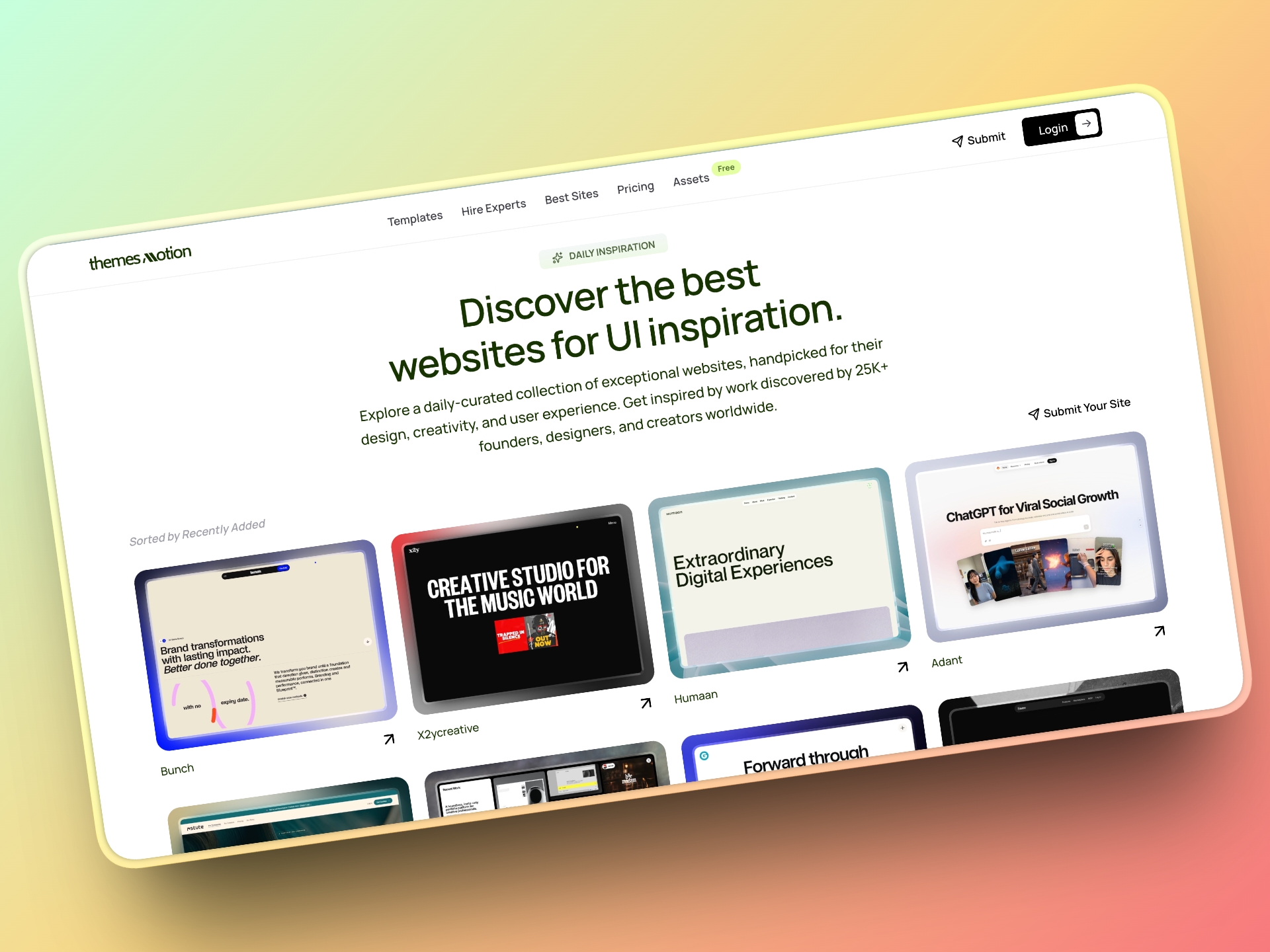
ThemesMotion is a discovery platform for people who create and work on the web. It brings design experts, freelancers, agencies, templates, digital products and premium design assets together in one place, so businesses and builders can find the right people and resources.
Here is how creators can use it to support a product catalog:
- Build one Design Expert Profile: A creator can pull their portfolio, professional profiles, social accounts, personal website and products from different platforms into a single profile, and share one link instead of many.
- Show products from different ecosystems together: Templates and digital products from platforms such as Framer, Webflow, WordPress, Figma, React and other ecosystems can be discovered in one place.
- Keep your existing checkout: Product listings help people discover and learn about a product, while the purchase itself is completed on the creator's original selling platform. You keep your existing checkout, pricing and files.
- Get found by businesses and founders: Businesses and individuals can look for designers, developers, freelancers and agencies based on their skills and work, and explore expert profiles, portfolios, projects, products and ways to work with them.
Bringing your catalog and portfolio into one profile makes it easier for potential customers and clients to see the full scope of what you build.
Your 90-Day (13-Week) Asset Sprint Roadmap
Launching a first commercial design product works best as a series of focused weekly deliverables. Thirteen weekly sprints cover roughly 90 days and keep the scope under control. All timelines are rough estimates based on typical part-time schedules.
| Sprints | Phase |
|---|---|
| 1 to 3 | Scoping, audience analysis and token architecture |
| 4 to 7 | Core components and responsive views |
| 8 to 9 | Documentation, changelog and file polish |
| 10 to 11 | Storefront setup and ThemesMotion profile |
| 12 to 13 | Public launch, release notes and v1.0.1 patch |
Sprint 1: Audience Problem Identification
- Focus: Target a specific user group with a clear design bottleneck, such as a landing page for AI developer tools or an operations dashboard for logistics startups.
- Deliverable: A written product spec covering target buyers, core use cases and non-goals for version 1.0.
Sprint 2: Competitive Teardown and Scope Boundary
- Focus: Study competing products. Read forums and reviews to find common frustrations, missing components and weak responsive behavior.
- Deliverable: A strict scope checklist with no more than 5 page layouts or 20 components.
Sprint 3: Token Architecture Setup
- Focus: Set up primitive variables, semantic token bindings, accessible color pairings and type scales in your design tool.
- Deliverable: A populated token foundation file ready for components.
Sprint 4: Atomic Components
- Focus: Build the core elements: buttons, form inputs, toggles, badges, dropdowns and modal dialogs.
- Deliverable: A component library built with Auto Layout and interactive states.
Sprint 5: Complex Modules
- Focus: Combine atoms into navigation headers, pricing tables, data grids and sidebar menus.
- Deliverable: A tested set of responsive modules that adapt smoothly when resized.
Sprint 6: Desktop Screen Assemblies
- Focus: Assemble your modules into complete desktop screens and workflows.
- Deliverable: High-fidelity desktop screens for every promised user journey and page template.
Sprint 7: Responsive Breakpoints and Mobile
- Focus: Build tablet and mobile layouts for every desktop screen from Sprint 6.
- Deliverable: Responsive variants checked at 375px, 768px and 1200px widths.
Sprint 8: Packaging and File Cleanup
- Focus: Remove unused color styles, detach test components, standardize layer names and check that frame constraints are correct.
- Deliverable: A clean, production-ready master file.
Sprint 9: Documentation and Changelog
- Focus: Write the onboarding guide, font licensing notes, customization instructions and the first
CHANGELOG.mdfor version 1.0.0. - Deliverable: A documentation page inside the file plus an exportable README.
Sprint 10: Storefront and Preview Graphics
- Focus: Set up your checkout page on Lemon Squeezy or Gumroad. Design accurate preview graphics and a component inventory.
- Deliverable: A staging product page ready to accept test purchases.
Sprint 11: ThemesMotion Profile Setup
- Focus: Create your Design Expert Profile on ThemesMotion. Link your portfolio, external stores and social accounts, and list your product.
- Deliverable: A complete profile showing your products and professional work in one place.
Sprint 12: Public Release and Community Demo
- Focus: Release v1.0.0. Share walkthroughs on social platforms, publish a short demo video showing Auto Layout responsiveness and announce the product in design communities.
- Deliverable: A launch announcement with product demos.
Sprint 13: Feedback Review and v1.0.1 Patch
- Focus: Review early bug reports, documentation questions and support requests. Fix constraint issues and confusing layer structures.
- Deliverable: Version 1.0.1 with release notes that thank your early adopters.
Frequently Asked Questions
How should I handle commercial and personal licensing?
Keep the terms simple. Offer a personal license for individual projects and a commercial license for teams, agencies or products with higher revenue. State clearly what buyers can do, such as building client projects, and what they cannot do, such as reselling or redistributing your raw design files as their own templates. If you are unsure about the legal wording, ask a qualified professional to review it.
What is a fair refund policy for digital design assets?
Digital files cannot be physically returned, so set expectations upfront. Many sellers offer refunds when a file has technical defects that cannot be patched or does not match what the preview page promised. Provide a video walkthrough or interactive preview so customers can judge the file structure before buying.
How often should I release updates?
Avoid shipping tiny patches every few days, because repeated downloads frustrate buyers. Batch small fixes every few weeks and release feature-heavy minor versions, such as five new dashboard views, roughly each quarter. Always list the exact changes in your changelog.
How should I price my first digital design product?
Avoid pricing so low that the product looks like a commodity. Very low prices can signal low quality and attract heavy support requests. As a rough guide, focused wireframe kits and icon sets often sell for around fifteen to thirty-five dollars, while full website templates and complex UI kits often sell for around forty-nine to ninety-nine dollars. These are rough estimates, so check current prices for similar products in your niche. Price based on the time your product saves the buyer.
How much time does a product catalog need each week?
After the initial build, maintaining a catalog of one to three assets often takes roughly two to five hours per week as a rough estimate. That time goes to answering questions, testing files when Figma or site builders release updates, and planning small quarterly additions.
Disclosure: I wrote this article as part of work promoting ThemesMotion.